Globus Connect Server Streaming Admin Guide
2. Creating a Stream Gateway and Stream Access Point
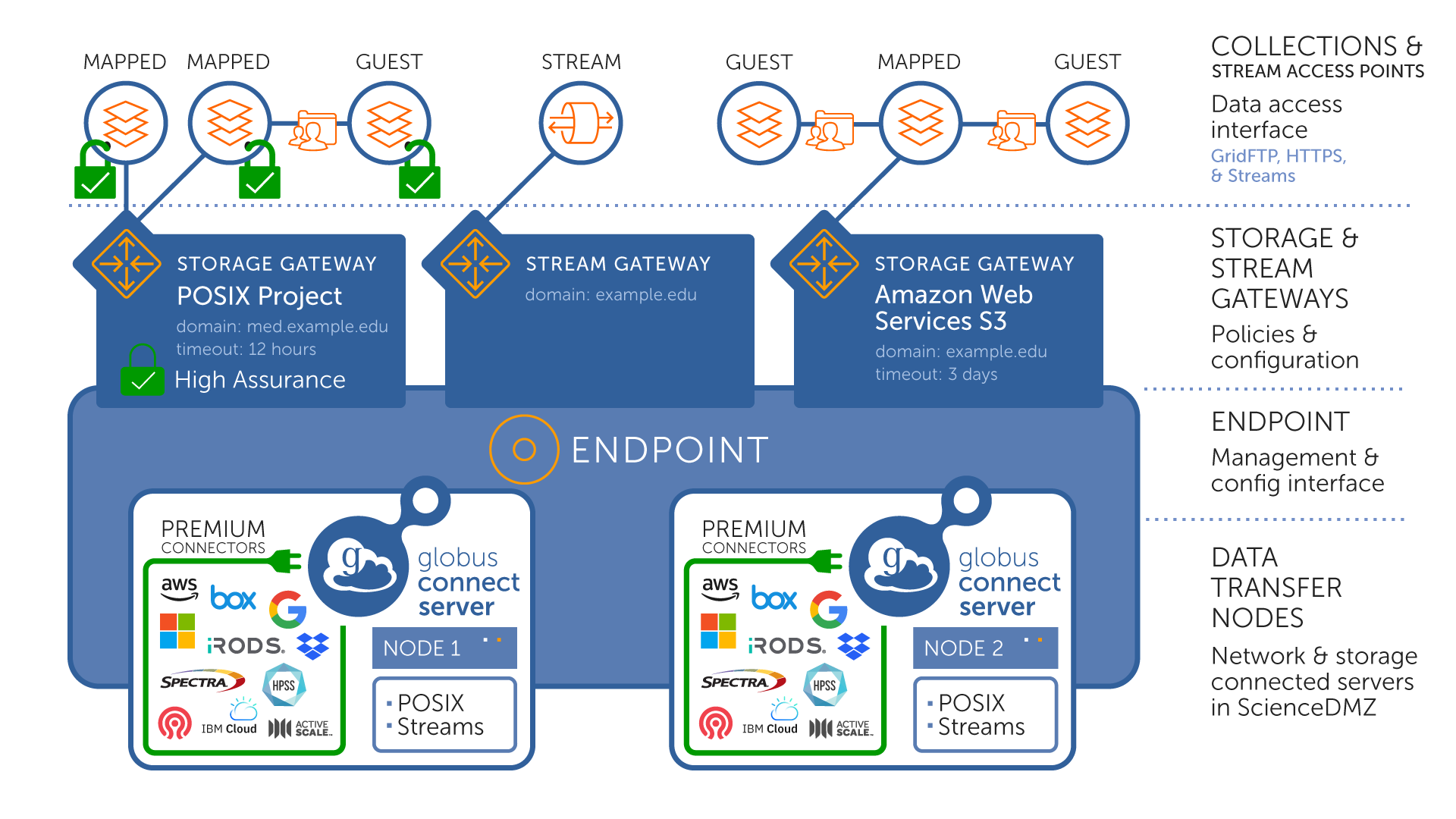
Once the installation and deployment of Globus Connect Server is complete, a stream gateway can be created. The stream gateway controls access to a stream access point much like a storage gateway controls access to a mapped collection. When you create a stream gateway, a stream access point with the same name is automatically created.
2.1. Stream Gateway Configuration
A stream gateway is created with the globus-connect-server stream-gateway create command. The options include familiar storage-gateway authorization policies such as --domain, --identity-mapping, and --user-allow/--user-deny, as well as the streaming-specific policies --lan-name, --lan-secret-required, and --run-as-local-user.
We’ll create a basic stream gateway with the default streaming policies.
The display name of the stream gateway is used for the stream access point as well. We’ll use a descriptive name like Example.org Streaming Access Point 1, and allow access from all users with an example.org identity.
globus-connect-server stream-gateway create "Example.org Streaming Access Point 1" --domain example.org3. Streaming Gateway Mapping
By default, user identities for a streaming gateway are mapped to the full user ID. For example, user@example.com is mapped to user@example.com. Administrators can change this behavior; see the mapping guide for details.
By default, when a user logs in, Globus Connect Services runs under the UNIX service account gcsweb. Administrators can instead configure services to run under a different UNIX account by mapping the identity to a local user name and enabling the --run-as-local-user option on the streaming gateway.
When --run-as-local-user is enabled, Globus Connect Services runs under the mapped local user account instead of the gcsweb service account. For example, if user@example.com is mapped to user1, then the services associated with that user’s tunnel will run as the UNIX user user1.
4. Globus Streaming LAN Interface Administration
By default, the Globus Streaming Gateway listens on all available network interfaces. In some environments, administrators may want tighter control over which interfaces are used for streaming connections. Common reasons include restricting access to internal users only, separating internal and external traffic, complying with network security policies, or ensuring that high-performance data transfers use specific network paths. Configuring LAN interfaces and associating them with stream gateways, allows administrators to explicitly control how streaming connections enter and exit the Globus Connect Server.
A Globus data stream is illustrated below:
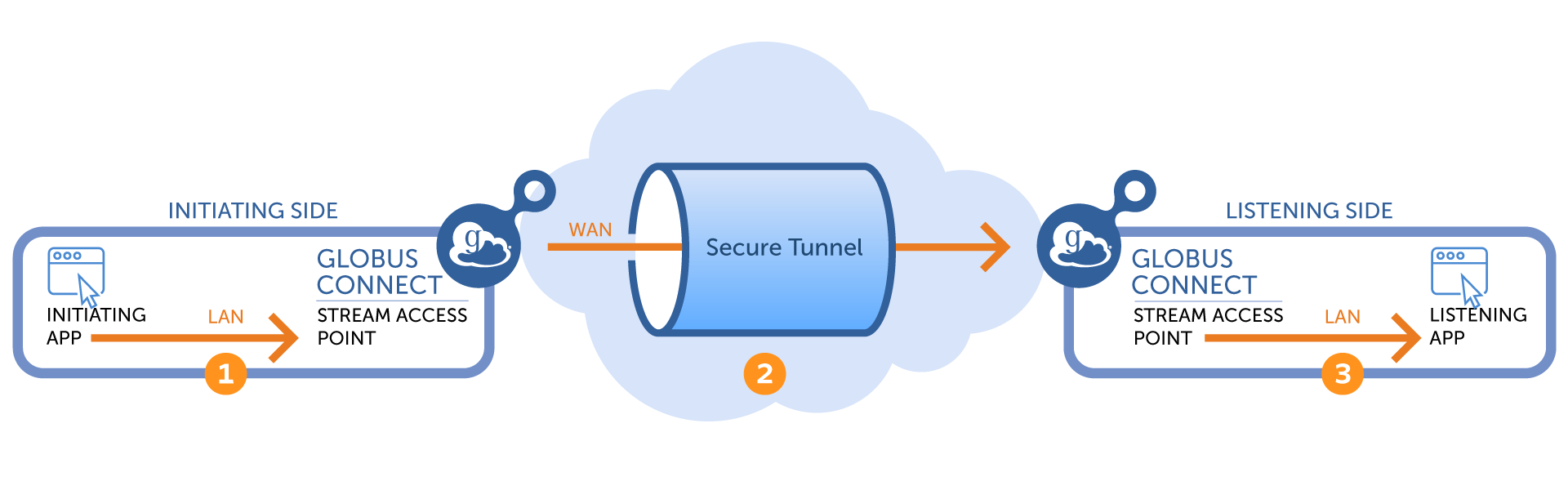
This section focuses on configuring the LAN segments (labeled 1 and 3 in the diagram). Each LAN segment is configured independently.
4.1. Interface Configuration
Administrators may want to control which network interfaces their GCS servers use to establish LAN segments between user applications and the GCS. This section describes that process in the context of a multi-node GCS deployment.
Consider a GCS deployment like the one shown below:
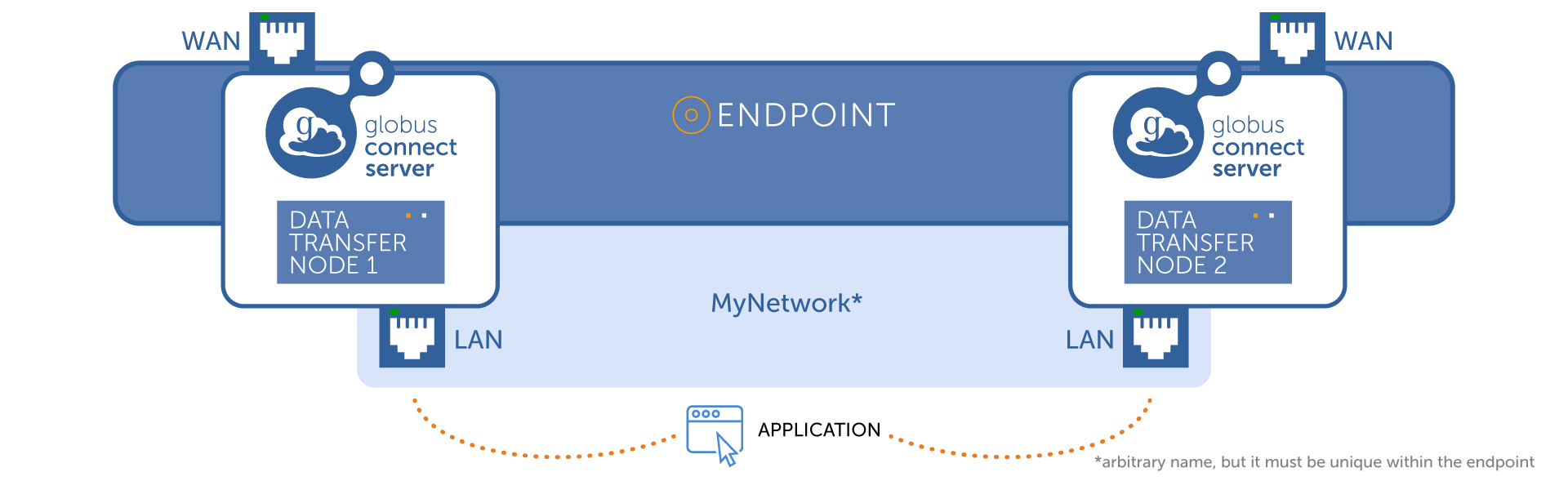
In this example, the conceptual endpoint consists of two nodes. Each node has two network interfaces: one connected to the data center’s internal LAN, and one connected to the external Internet. By default, the Streaming Gateway listens for incoming connections on all available interfaces. However, administrators may wish to restrict access to the LAN interface only, ensuring that only internal users can connect.
To do this, an endpoint administrator must first choose a name for the LAN. This name can be arbitrary, but it must be unique within the endpoint. Next, the administrator associates this LAN name with a specific IP address on each node in the endpoint. The following CLI command shows an example:
globus-connect-server node update --lan-address 192.168.10.50 MyNetwork c0aa082c-fdf7-4c7a-9554-675c044f8951In this example, the administrator is configuring the GCS node so that whenever a Globus streaming tunnel needs to listen on the LAN named MyNetwork, it will listen only on the address 192.168.10.50.
The address 192.168.10.50 must be bound to a network interface on that node. Because each data transfer node (DTN) backing a Globus endpoint will typically have a different IP address, this command must be run for each node that backs the endpoint. The same LAN name (MyNetwork) must be used on all nodes, but the associated IP address will differ per node. In this way, a set of node-specific IP addresses is grouped under a single conceptual network name.
Once MyNetwork has been defined on all nodes, the administrator can configure the Streaming Gateway to use only that network when establishing the LAN segments of a stream. This is done with the following command:
globus-connect-server stream-gateway update --lan-name MyNetwork c0aa082c-fdf7-4c7a-9554-675c044f8951
5. Additional Reading
- Streaming Overview
-
A high-level introduction to Globus Streaming
- Streaming User Guide
-
A guide on how to use Globus Streaming with an existing application.
- Streaming Connection Authentication
-
A description of the authentication protocol used between your application and the Globus Connect Server.
6. Support
For questions on streaming, please contact support@globus.org.