Globus Streaming
Globus Streaming allows existing TCP-based applications to communicate securely across wide-area networks and through firewalls without exposing inbound ports, managing SSH keys, configuring VPNs, or modifying application code.
Applications continue to use standard socket APIs while Globus transparently routes traffic through authenticated tunnels established between Globus Connect Server deployments.
Globus Streaming is designed for:
-
administrators who need to provide users with secure connectivity to external laboratories, campuses, or partner institutions
-
developers who need to connect geographically distributed data sources, instruments, services, or compute resources
1. Introduction
Globus Streaming enables applications to securely stream data across wide-area networks (WANs). It is designed for workflows that require communication between geographically distributed systems, such as scientific instruments, laboratories, campuses, and high-performance computing (HPC) centers.
As a capability of Globus Connect Server (GCS), Globus Streaming uses the same authenticated control channels and security mechanisms that Globus uses for data transfer. Administrators deploy stream gateways on GCS endpoints and configure stream access points that users can authenticate to and use to establish tunnels between sites.
Once a tunnel is established, applications communicate through it using standard TCP sockets. Globus provides tooling that transparently routes application traffic through the tunnel, allowing existing applications to stream data securely across WANs with little or no application modification. The Globus web application and CLI provide interfaces for discovering stream access points, creating tunnels, and monitoring active connections.
The Globus web application and CLI offer interfaces for discovering stream access points, creating tunnels, and monitoring and managing established tunnels.
2. Key Highlights
-
Provides authenticated, bidirectional data streaming across WAN without requiring pre-deployed keys (e.g., SSH keys)
-
The entire tunnel route is authenticated securing each leg of the connection. End-to-end encryption is left to the users' applications.
-
Leverages well-established mechanisms for secure wide area network connections used in Globus data transfer
-
Consistent security model, where GCS security configuration (authentication and authorization policies) is applied to streaming capabilities
-
Globus provided tooling for minimal to no code change in the applications that stream data
3. High Level User Walk Through
-
The user discovers the stream access points on resources they want to stream between, for example, stream access points on GCS deployments at an instrument facility and at an HPC center. They then authenticate to meet the policy on each of the stream access points, and submit a request to create a tunnel between the two access points.
-
Globus transfer service uses the control channel connection to the GCS deployments at both sites to establish a secure tunnel between the access points.
-
A tunnel identifier is returned to the user.
-
Using Globus tooling, the user configures their applications to use the tunnel to stream data.
-
Globus seamlessly routes application connections through the tunnel.
4. Example Application
A good example use case for Globus Streaming is an electron microscope in a university laboratory communicating with high-performance computing resources at a facility such as the Argonne Leadership Computing Facility.
Imagine an application controlling an electron microscope. One process runs next to the microscope and collects image data. That data is then sent to a second process that analyzes the image to identify features of interest. Based on the results, the application may request a higher magnification image, move the microscope to a new location, or capture an additional sample.
While this workflow is effective, the compute resources available at the university may be limited, creating a bottleneck that increases the amount of time required on the microscope. The researchers may already have access to powerful computing systems at the ALCF, but establishing direct network connectivity between the university lab and the remote computing facility is impossible due to firewalls, NATs, and institutional network policies.
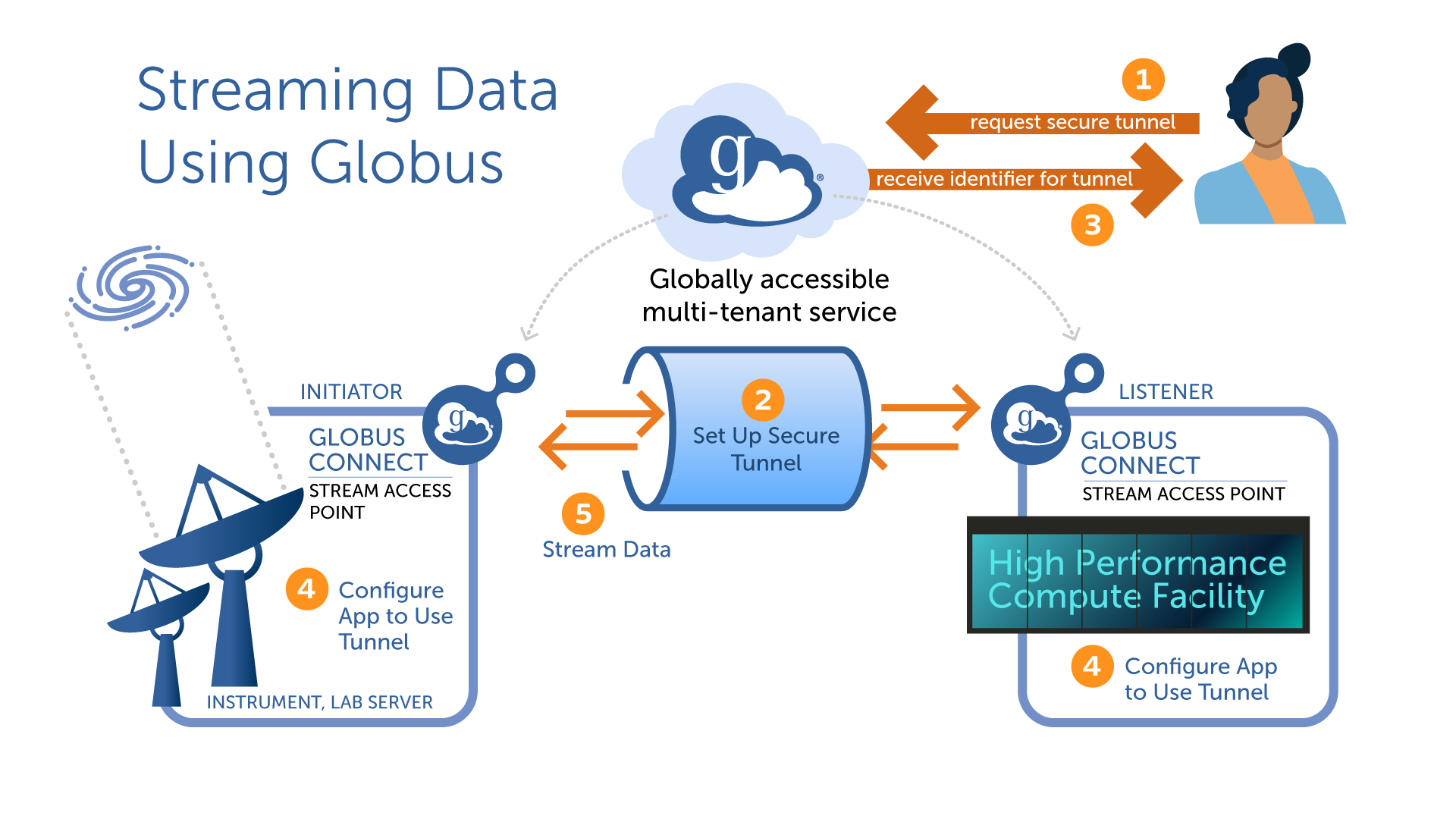
This is where Globus Streaming can help. A user can create a Globus Tunnel between the Globus Connect Server deployment at the laboratory and the deployment at the ALCF. Applications can then open streams across that tunnel, allowing the microscope control and analysis processes to communicate securely across the wide-area network as though they were on the same local network.
5. Related Guides
- Streaming Admin Guide
-
How to deploy and configure Globus Connect Server with streaming support.
- Streaming User Guide
-
How to use Globus Streaming with your application.
- Streaming Connection Authentication
-
A description of the authentication protocol used between your application and the Globus Connect Server.
6. Support
For questions on streaming, please contact support@globus.org.